
Quick answer
Ask what the code is for before using it. A merchant asking you to scan their code and a cashier asking to scan your payment code are two different checkout flows. A restaurant menu code may only open a menu. A metro ride code belongs to its transport service. They are not interchangeable.
The QR format itself does not determine whether a local bank account or phone number is required. Eligible international-card merchant payments can use an overseas card; transport and other services have their own activation rules.
Match the code to the task
| What you are doing | What to check | What does not prove success |
|---|---|---|
| Scanning a merchant code | Merchant name, amount and selected funding method before confirmation | Merely opening the scan result |
| Showing your payment code | That you are on the wallet's pay screen and at the intended cashier | Showing your profile or receive-money code |
| Opening a menu | Restaurant, table number and whether payment is a later step | Seeing the menu on your phone |
| Entering a metro gate | Correct city and activated ride service | A normal wallet payment code |
Use Scan for a merchant code; follow Pay/Collect for the applicable code display. Protect payment codes.
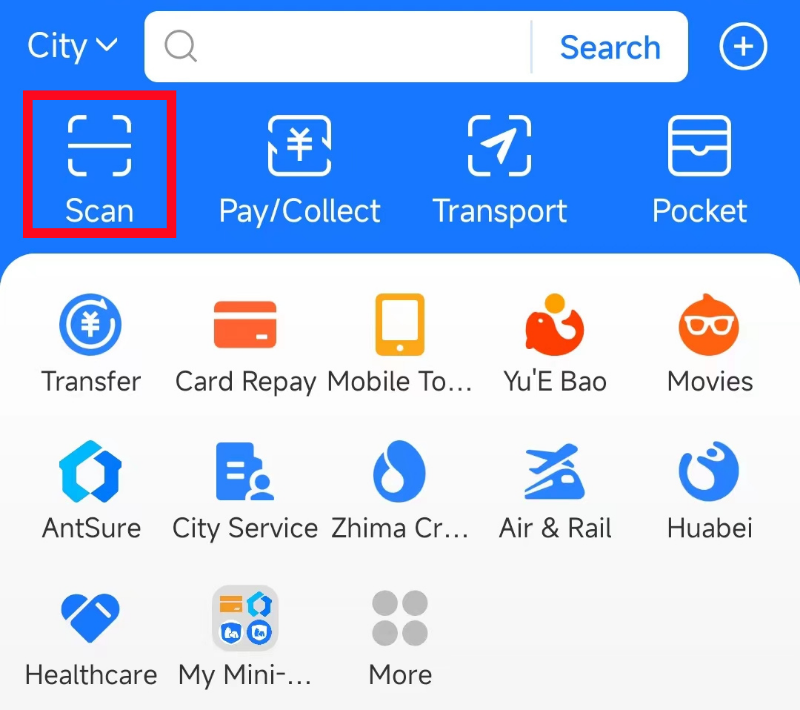
Alipay home screen: Scan and Pay/Collect are different actions.
Image source: Shanghai International Services. Screenshot rights remain with the publisher. Reference example; screens can vary by device, account and app version. Dates and prices shown are not live.
At a staffed checkout
Open your wallet yourself. If the cashier points a scanner at your phone, ask whether they need your payment code. If you are told to scan, use the wallet's scan control, then check the resulting merchant and amount. Confirm only the purchase you intended. Keep a live payment code private; it should not be saved in a travel screenshot or sent to someone offering help.
Check the app's transaction details if the cashier has not received confirmation. Do not repeat a payment merely because a translated screen is unclear. Use the existing pending payments and refunds guide to identify the next step.
When the code is rejected
A successful scan does not guarantee that your linked overseas card can fund this transaction. Ask for another supported checkout method, use a payment backup, or ask staff for a physical ticket or menu. Do not send money to a stranger's account as a workaround.
Read the exact workflow
- Alipay setup and merchant payment
- WeChat Pay setup
- Metro ride QR codes
- Restaurant QR menus
- Chinese button names explained
Sources and review
Sources checked on 2026-09-10. This guide combines the existing site guides linked above with the following source material. The decision steps are editorial guidance. No app-account or on-location field test was performed.