
Quick answer
Alipay lets eligible visitors link a supported international card for merchant payments in mainland China. Register with a number that receives SMS, add your card in the app and test a small merchant purchase after arrival. Keep another payment option ready. China's official visitor payment guide describes mobile wallets, bank cards and cash as available options.
Paying a merchant, receiving money, transferring money and topping up a balance are different tasks. This guide covers visitor spending, not international settlement or merchant collection accounts.
What to prepare
- Your own phone and an SMS-capable number; a data-only eSIM does not provide SMS service.
- The card you intend to use, and access to any approval method required by its issuer.
- Your passport for identity checks when the app requests them.
- A physical card or RMB cash as a backup, with a way to contact your bank.
Set up before departure where possible. Shanghai's Alipay guide says a foreign number can be used to register before arrival. Keep that number usable while you depend on the account.
Set up Alipay
1. Install and register
Find Alipay in your normal trusted app store and check the publisher. Register with your own phone number and correct country code. Choose English or the visitor option if offered by your version. Do not send your password or SMS code to someone offering account activation.
2. Add a card
Shanghai's illustrated flow uses Me → Bank Cards. Follow the app's fields and issuer checks. Enter the security code requested for your actual card; code length and location vary by card, so do not assume it is always four digits on the back.
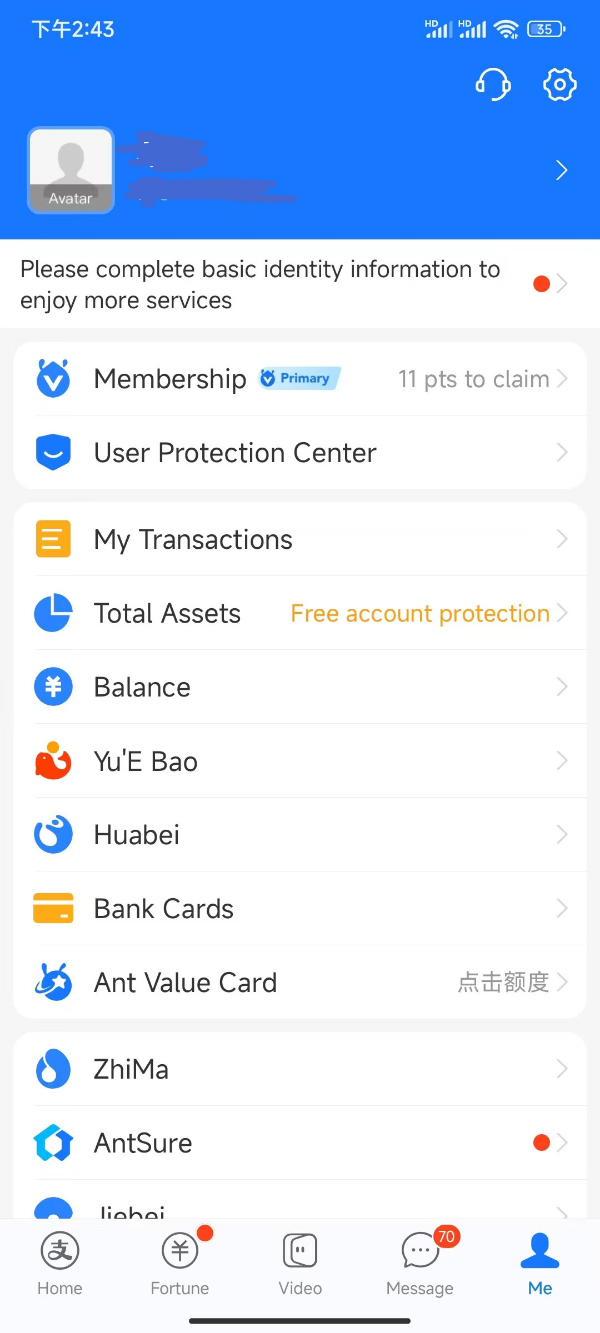
Source example: International Services Shanghai, updated July 21, 2026; retrieved September 10, 2026 and source rechecked September 11. The publisher obscured personal details. Other financial products shown are not necessarily available to visitors. Tap to enlarge; app version was not specified. Rights remain with the original publisher.
3. Complete the identity check requested in your account
Use your own valid document and enter the name consistently with the requested fields. If a page asks for a mainland bank account you do not have, check whether you opened a different product rather than the visitor card-payment flow. Use in-app support if unsure; do not enter invented identity details.
4. Try a small merchant payment
After arrival, ask a cashier whether to scan the shop's code or show your payment code. Verify the merchant and amount, select the intended card if available, then check the result with the cashier. A successful card link alone is not a completed payment test.
Which button should I use?
| Label or task | What it means | Your check |
|---|---|---|
| Scan / 扫一扫 | Your phone reads a code in front of you | Confirm it is the intended merchant or service before continuing. |
| Pay / Payment code / 付款码 | The cashier scans your code | Check the selected funding source. Do not share a screenshot of an active payment code. |
| Collect / Receive / 收款 | Receiving money | This is not the code to show when paying a shop. |
| Bank Cards / 银行卡 | Managing linked cards | Check the final digits to identify the card you intend to use. |
| My Transactions / 账单 | Reviewing previous payments | Open the matching order to check its status or contact support. |
See scan or show a QR code for the two payment flows. A QR code opening successfully does not prove the resulting transaction accepts your foreign card.
Use the control that matches what the cashier asks you to do.
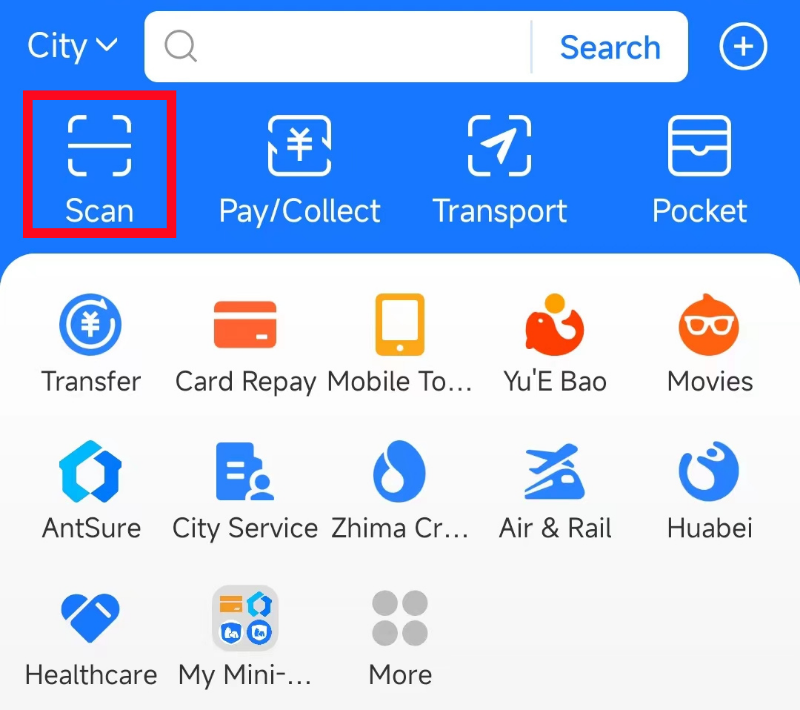
Alipay home screen: Scan and Pay/Collect are different actions.
Image source: Shanghai International Services. Screenshot rights remain with the publisher. Reference example; screens can vary by device, account and app version. Dates and prices shown are not live.
Cards, balance and fees
Use the card types shown in your account. Acceptance can depend on the issuing bank and transaction. For example, Alipay's American Express announcement says eligible Amex cards can be linked, but excludes cards issued by third parties outside mainland China. A card-network logo is therefore not a universal guarantee. Alipay announcement.
You do not need to seek a “top-up agent” merely because a linked-card payment failed. First check the transaction type and error. Personal transfers, wallet balance and merchant spending can have different requirements.
Read the total shown before confirming, including any wallet fee. Your issuer can separately apply its own exchange rate or card charges. Use the fees and limits guide to distinguish these costs, and check the current terms for your own card.
Recurring payments and automatic deductions
A subscription renewal and a password-free payment authorisation are not necessarily the same thing. Read the named service and agreement before changing it, especially if it is used for transport.
Huawei's support guide gives this Alipay path: Me / 我的 → Settings (gear) → Payment Settings / 支付设置 → Automatic renewal / Password-free payments / 自动续费/免密支付. Open the specific service you want to stop and follow its close-service confirmation. English labels and menu order may vary. Huawei's device-support instructions.
Check that the selected service now shows the intended status and retain the confirmation. Review any ongoing subscription with the provider too. Do not assume uninstalling an app, removing a card or stopping a future authorisation refunds a past charge. If the debit is disputed, open the transaction and use the provider's support process.
If something goes wrong
| Problem | Next step |
|---|---|
| Card is linked but payment fails | Read the error and transaction type; check any issuer approval request. |
| No SMS arrives | Check country code, active SIM and roaming. Avoid repeated rapid requests. |
| Merchant cannot see the payment | Open the transaction together and distinguish pending, failed and completed before paying again. |
| A mini program asks for more information | Its account or payment conditions may differ from Alipay's basic card setup. |
| An unexpected deduction appears | Find the named merchant, transaction and authorisation; use official in-app support. |
For an unresolved order, follow the pending payment and refund checks. Use the payment backup plan if you need to complete a purchase while resolving the problem.
Know which step has actually finished
Account created: you can sign in with your own number. This does not prove that a bank card or identity check has been accepted.
Card added: your intended card appears in the account. Before paying, check the selected card and any approval request from its issuer.
Purchase completed: the matching transaction shows a successful result, with the expected merchant and amount. Ask the cashier to check their side if there is doubt. A bank notification or a loading screen alone is not enough to settle a disagreement.
If the connection drops after confirmation, open the existing transaction before starting another payment. For your next task, read scan or show a QR code; for an unclear result, use the pending-payment guide.
FAQ
Can I set up Alipay outside China?
Shanghai's guide describes registration with a foreign number before arrival. Complete the steps available in your account, then test a merchant payment after arrival; setup is not proof that every service works abroad or in China.
Do I need a Chinese bank account?
Eligible visitor merchant payments can use a supported international card. Other Alipay products may have different eligibility requirements.
Does this explain international settlement or collection?
No. Those searches can refer to business payment services. They are separate from a tourist linking a card to pay a merchant.
Sources and review
Sources checked September 11, 2026. Troubleshooting and backup steps are editorial guidance. No device field test was performed.