
Quick Answer
For everyday merchant payments, prepare Alipay or Weixin Pay with an eligible international card, plus RMB cash and a physical-card fallback. Check what the merchant accepts and the final amount before confirming; wallet setup does not guarantee every kind of transaction.
If this happens, do this
| Situation | What to do next |
|---|---|
| A cashier shows a merchant QR | Scan inside the supported wallet, check the merchant and amount, then confirm. |
| A cashier scans your code | Open the live payment code in your wallet; do not share it in a screenshot. |
| A terminal accepts your physical card | Check the currency and final amount on the terminal. |
| A wallet or phone is unavailable | Use cash or another method accepted by the merchant. |
Foreign Card Fees and Limits in China.
The Safe Payment Stack
1. Alipay
Alipay is often the easiest payment starting point for short-term visitors. Install it before departure, register with a phone number that can receive SMS, add an international card and test a small payment after arrival. Use it for QR payments, some metro transport codes, small shops, restaurants and travel mini programs.
2. WeChat Pay
WeChat Pay matters because WeChat is used for communication, mini programs, restaurant ordering and QR payments. Even if Alipay works better for you, WeChat Pay is a useful backup. Some merchants or services may be easier through WeChat.
3. Bank card
Large hotels, airports, higher-end restaurants and international chains may accept international cards, especially where the card network logo is displayed. Smaller merchants may not accept a physical foreign card even if they can accept Alipay or WeChat Pay linked to that card.
4. Cash
Keep some RMB cash for emergencies, small purchases, network outages or situations where your app fails. Official guidance also emphasizes cash availability and bank-card acceptance, so cash remains a legitimate backup option for visitors.
Understand the checkout before retrying
If the cashier wants to scan your screen, open the wallet payment code. If you scan the merchant, check their name and amount before confirming. A menu or metro code serves a different purpose. Use Which QR code? when you are unsure.
Check which side should scan and wait for a clear payment result.
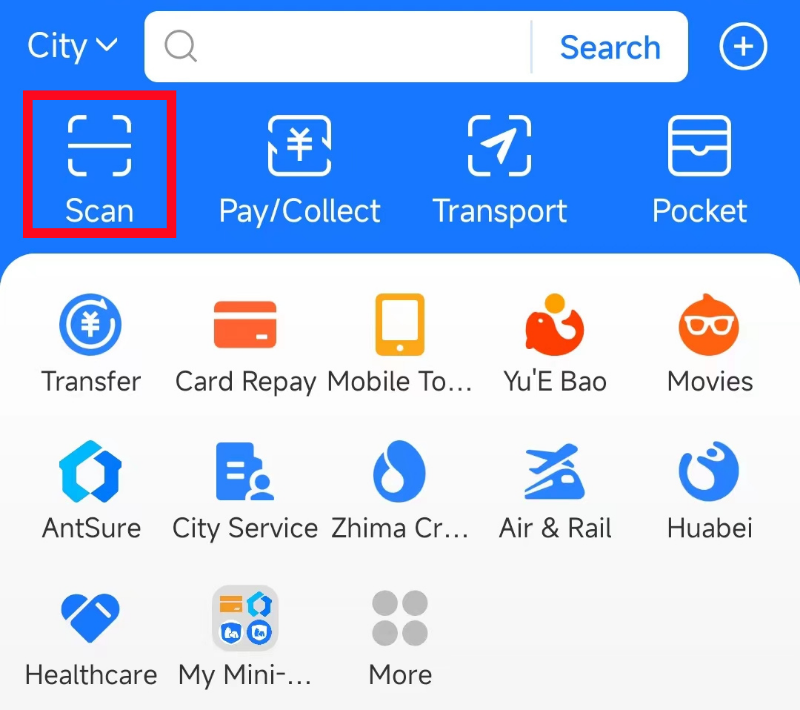
Alipay home screen: Scan and Pay/Collect are different actions.
Image source: Shanghai International Services. Screenshot rights remain with the publisher. Reference example; screens can vary by device, account and app version. Dates and prices shown are not live.
What to Set Up Before Departure
- Install Alipay and WeChat.
- Add at least one international card to each wallet if supported.
- Tell your bank you will be in China and enable overseas online transactions.
- Save your hotel address in Chinese.
- Prepare a backup card from a different bank if possible.
- Carry some RMB cash or know where you can withdraw/exchange cash.
- Save official customer-service contacts and non-sensitive setup notes. Do not screenshot live payment codes, full card details, identity documents or verification codes.
Common Payment Failures
Card declined inside the app
Check the order status and any bank authentication request (sometimes called 3-D Secure). Ask your issuer about the exact decline before retrying. If the payment has failed, agree on a supported backup with the merchant. Do not split purchases to bypass limits.
Merchant cannot accept your foreign-card-backed wallet
Some merchants may not support every transaction route. Try the other wallet, pay cash, or use a different card.
SMS verification fails
Check roaming, eSIM settings and whether your number can receive international SMS. Set up wallets before arriving whenever possible.
You hit a limit
Official policy has raised visitor mobile-payment limits, but your wallet, card issuer or account verification status may still create smaller practical limits. Use a bank card or cash for larger payments such as hotel deposits.
Best First-Day Strategy
After landing, do not wait until you are in a taxi or at a restaurant cashier to test payment. Buy something small at the airport, hotel or a convenience store. Confirm that the payment shows completed. Then keep the backup methods ready.
Related Guides on Get Around CN
Disclaimer
App interfaces, payment rules, station practices, hotel policies and local procedures may change. Treat this guide as a source-checked practical guide, then verify important details with the official service, your hotel, transport staff or your card issuer before relying on it in an urgent situation.
Sources and review
Sources reviewed on 2026-09-10. These sources support the service or policy facts; the practical fallback steps are editorial guidance. This is not a recorded field test.