
Quick Answer
Register WeChat first, then activate the payment service and link an eligible international card using the prompts shown to your account. Messaging registration and payment verification are separate. A linked foreign card is mainly a way to pay eligible merchants; do not count on person-to-person transfers.
If this happens, do this
| Situation | What to do next |
|---|---|
| WeChat asks for friend verification | Follow the requirements shown on your screen. Do not pay strangers selling verification or accounts. |
| You cannot find the payment service | Use the official Help Center and your current app settings; account region and eligibility can differ. |
| A service fee is shown | Check the fee and total shown for this transaction before confirming. |
| A personal QR code does not work | Ask whether a merchant payment code is available or use another method. |
Register WeChat with a Foreign Phone Number.
What WeChat Pay Is Best For
Use WeChat Pay for:
- Paying merchants that display WeChat QR codes.
- Paying inside WeChat mini programs.
- Restaurant QR code ordering.
- Communicating with hotels, guides or local contacts.
- Backup payment when Alipay fails.
WeChat Pay is not only about card payment. Its value comes from being embedded into WeChat, which many Chinese businesses use as their default communication and service layer.
Before You Start
Prepare:
- WeChat installed and working.
- A phone number that can receive SMS.
- Passport information if verification is requested.
- A supported international bank card.
- Alipay or cash as backup.
If you are new to WeChat, set up the account before traveling. New accounts sometimes trigger security checks when login behavior changes, so do not wait until you need to pay urgently.
Step-by-Step Setup
1. Create or sign in to WeChat
Install WeChat from your app store. Register with your mobile number and complete any security checks. Keep the app logged in before arrival.
2. Open the wallet area
Depending on your app version and region, payment features may appear under Me, Services, Wallet, Cards, or a similar label. If the wallet area is missing, check the current official help for your account. Do not change identity or region details just to expose a menu; use a payment backup if eligibility is unclear.
3. Add an international card
Choose to add a card and enter the details exactly as your bank expects them. Some cards require 3-D Secure or bank app confirmation. If verification fails, read the error and check the issuer approval request before trying another eligible card.
4. Complete identity verification if prompted
Use your passport name and passport number carefully. If you use a nickname or a different name order, payment verification can fail later.
5. Test in a low-risk situation
Try a small convenience store payment before relying on WeChat Pay for transport, restaurants or hotel deposits.
Creating a messaging account does not complete payment verification.
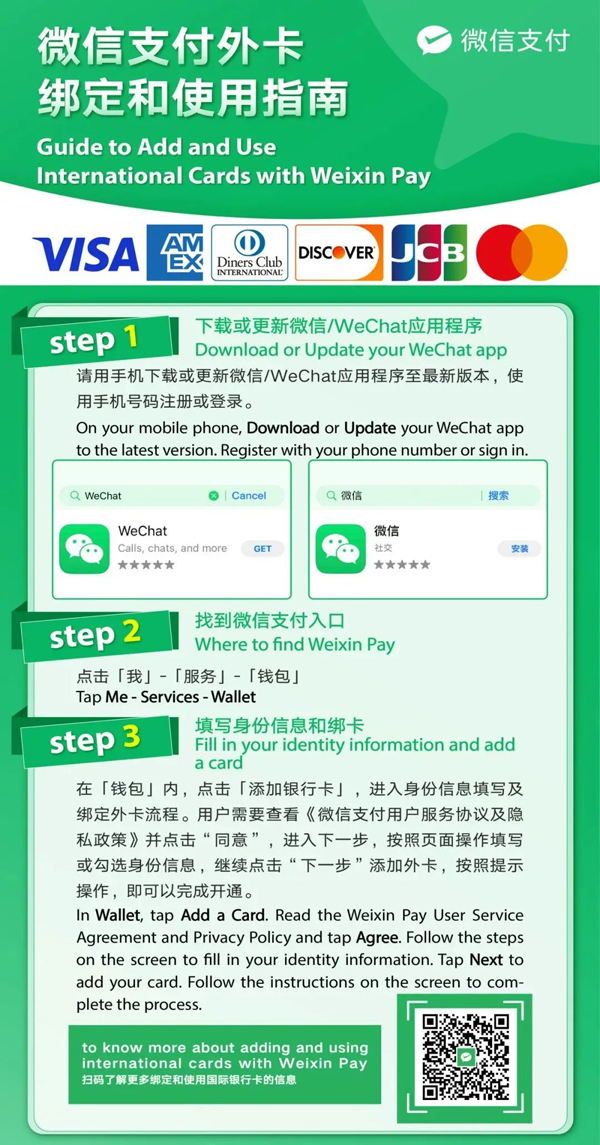
Weixin Pay guide: Me → Services → Wallet, then add a card.
Image source: Shanghai International Services. Screenshot rights remain with the publisher. Reference example; screens can vary by device, account and app version. Dates and prices shown are not live.
How to Pay
You will usually do one of these:
- Scan merchant QR code: open scan, scan the code, enter amount, confirm.
- Show payment code: open the payment code and let the cashier scan it.
- Pay inside mini program: confirm the order and choose WeChat Pay at checkout.
When paying from an international card, the payment may show a card network or service fee depending on the transaction type and current policy. Always check the final amount before confirming.
What May Not Work
Some functions may be limited for international-card users. Person-to-person transfers, red packets, wallet balance functions or certain local services may require a Chinese bank card or additional verification. For travel use, focus on merchant payments, QR code payments and mini program checkout rather than social wallet features.
Common Problems
Wallet does not appear
Check the current app version and official help for your account’s available payment features. Do not sign out during travel unless you can complete the sign-in and recovery checks. A missing wallet entry is not solved by guessing region or identity details; keep a working payment backup.
Card verification fails
Try another card, make sure online and overseas payments are enabled, and check that your billing information matches your bank.
Merchant cannot accept your payment
Some merchants may not support the exact transaction route for your international card. Use Alipay, cash, or another card-backed wallet as backup.
Practical Recommendation
Prepare one working merchant-payment method and a usable backup before an urgent purchase. WeChat messaging, payment and mini-program features can have different requirements; install only the services you expect to use.
Check the payment result before leaving
Work through three separate checks:
- Before confirming: identify the merchant, amount and selected payment method. If you scanned a restaurant menu, finish reviewing the order before approving its payment.
- After confirming: open the matching payment or order record and read its status. Being able to chat, scan a code or add a card is not proof that this purchase was paid.
- If the result is unclear: ask the cashier to check the same transaction. Do not immediately repeat the purchase just because a screen stopped loading.
The official illustrated Weixin Pay guide is a visual reference. Account menus may differ. For a code you cannot identify, use our scan-or-show explanation; for an uncertain charge, follow the payment-status checks.
FAQ
Can foreigners use WeChat Pay with international cards?
Many foreign visitors can link supported international cards, but availability can vary by card network, bank, account status and transaction type.
Do I need a Chinese bank account?
No for many basic merchant payments, but a Chinese bank account may unlock more wallet functions.
Is WeChat Pay better than Alipay?
Choose according to the payment flow and account checks that work for you. Keep another method for a merchant or service your selected wallet cannot handle.
Next steps
Sources and review
Sources reviewed on 2026-09-10. These sources support the service or policy facts; the practical fallback steps are editorial guidance. This is not a recorded field test.