
Quick Answer
Ask whether a table QR code opens a menu or a payment screen before scanning. Check the restaurant and table number, review the order, and confirm the total. If the mini program will not open or payment fails, ask staff for a menu and another way to order.
If this happens, do this
| Situation | What to do next |
|---|---|
| The code opens a mini program | Check the merchant name and table number before adding dishes. |
| Only Chinese text is shown | Translate a screenshot without including personal or payment details. |
| An ingredient matters for your health | Ask staff directly. A translated menu is not reliable allergy verification. |
| The bill says unpaid after you paid | Show the transaction status and ask staff to check the order before paying again. |
Translate Chinese App Screens and Menus.
Basic Workflow
- Sit down and look for a QR code on the table.
- Scan it with WeChat or Alipay.
- Confirm the table number if shown.
- Translate categories and item names.
- Add dishes to cart.
- Choose quantity, spice level or options.
- Submit the order.
- Pay if required before cooking.
- Keep the order page open in case staff asks.
Scanning can open a menu. It does not by itself submit or pay for an order.
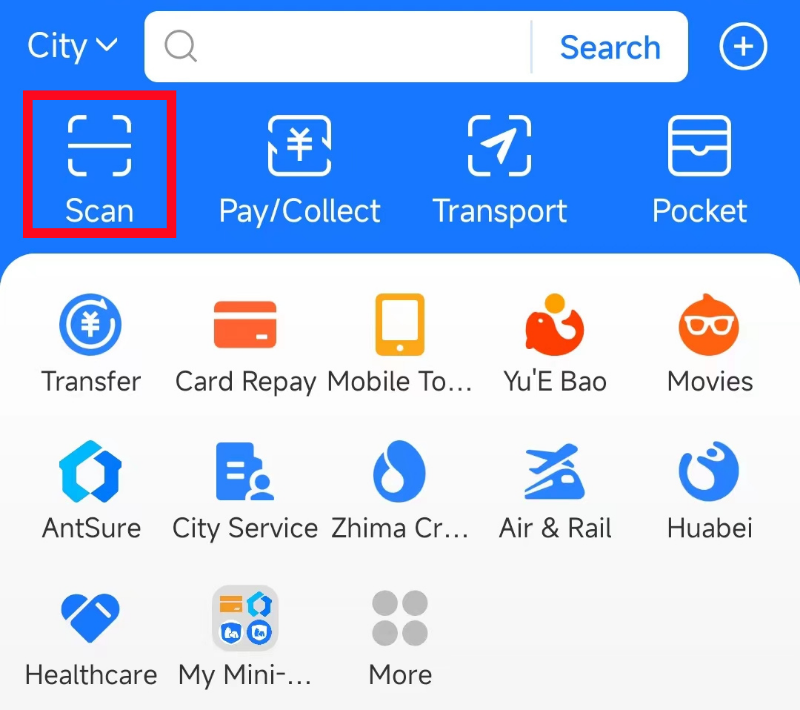
Alipay home screen: Scan and Pay/Collect are different actions.
Image source: Shanghai International Services. Screenshot rights remain with the publisher. Reference example; screens can vary by device, account and app version. Dates and prices shown are not live.
Opening a menu does not place or pay for an order
Check the table number, cart and final confirmation. A menu screen, an order confirmation and a paid receipt are different stages. Ask staff which stage you have reached if the status is unclear. Common app terms can help you read the screen.
WeChat or Alipay?
Some restaurants use WeChat mini programs. Others use Alipay mini programs or standalone web menus. If one scan method does not open correctly, try the other app or the phone camera.
Translation Tips
Use your phone’s screenshot translation. If the menu blocks copying text, take screenshots of categories and item pages. Look for photos, sales count and common labels:
- 招牌: signature dish
- 推荐: recommended
- 辣: spicy
- 微辣: mildly spicy
- 不辣: not spicy
- 米饭: rice
- 饮料: drink
Payment Problems
If payment fails, do not keep submitting the same order. Ask staff whether you can pay at the counter. Try Alipay, WeChat Pay or cash. Some restaurants let you order first and pay after eating; others require prepayment.
Allergies and Dietary Needs
QR code menus are not ideal for serious allergies. Use translated written notes and confirm with staff. Do not rely only on app translation for medical-level dietary restrictions.
Common Mistakes
Ordering from the wrong table
Check the table number on the page.
Accidentally ordering delivery or pickup
Some restaurant apps include dine-in, takeaway and delivery modes. Choose dine-in if you are seated.
Missing required options
Many dishes require spice level, size, soup base or add-ons before you can submit.
Thinking the order went through when payment failed
Check whether the order shows paid or submitted.
Useful Phrase
我看不懂菜单,可以帮我点餐吗?
I cannot understand the menu. Could you help me order?
Related Guides on Get Around CN
Disclaimer
App interfaces, payment rules, station practices, hotel policies and local procedures may change. Treat this guide as a source-checked practical guide, then verify important details with the official service, your hotel, transport staff or your card issuer before relying on it in an urgent situation.
Sources and review
Sources reviewed on 2026-09-10. These sources support the service or policy facts; the practical fallback steps are editorial guidance. This is not a recorded field test.