
Quick answer
Capture the non-sensitive screen, translate its text, then return to the original app and confirm what you are about to select. Translation is a reading aid. It does not verify the merchant, a payment amount, account eligibility or food ingredients.
Words that need context
A translated “successful” message may refer to registration rather than payment. Read the whole status and match it to the task. The app glossary explains verification, payment codes, deposits and refunds in plain English. Save the offline kit before you need it.
On an iPhone
Apple documents Live Text for copying and translating text in supported photos. Open your screenshot in Photos and look for the text-selection controls. Availability depends on the device, operating system, language and region. If the feature is unavailable, use an installed translation app that can import an image.
Use the photo-picker control for a saved screenshot, then compare important names with the Chinese original.
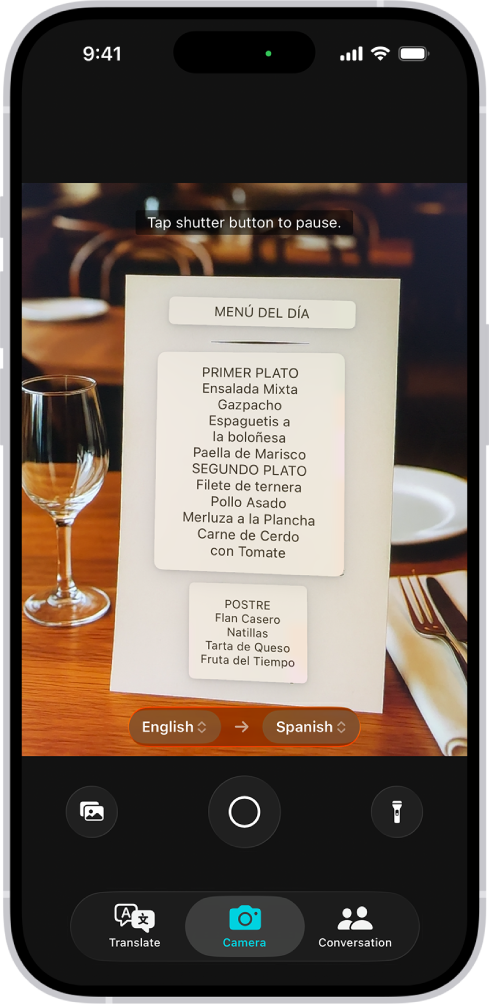
Apple Translate camera example uses English and Spanish. For a Chinese menu, choose Chinese and your reading language.
Image source: Apple Support. Screenshot rights remain with the publisher. Reference example; screens can vary by device, account and app version. Dates and prices shown are not live.
On Android
Google Translate documents image import and camera translation. Open the translation app, select the appropriate languages and choose the saved screenshot or camera option. Network availability in mainland China depends on the service and connection, so test your chosen tool before the trip. Do not promise yourself that every image feature will work offline.
Prepare offline camera translation before departure
Google’s Android help documents offline camera translation for downloaded languages. While connected, open Google Translate, tap Camera, open the language picker and download the languages you need. Wait for the download to finish. Then test Chinese-to-your-language camera translation on a non-sensitive sign with internet disconnected, and reconnect afterwards. Treat this as preparation for that specific feature; it does not prove every image-import feature or another translation app works offline. Keep a saved address and essential phrases as a fallback.
A careful workflow
- Hide private fields before capturing anything: passwords, codes, card information and passport details do not belong in a translation upload.
- Capture only the screen needed to understand the task.
- Read the translated labels and compare numbers against the original.
- Return to the original app and confirm the merchant, date, location and amount.
- Ask a staff member if a decision remains unclear.
Keep names in Chinese
Do not replace a hotel or station’s official Chinese name with a fresh translation. Copy the name and full address from the booking. A translated brand can hide the difference between two branches. Use the address-card tool for something readable to show a driver.
When translation is not enough
For cancellation conditions, read the full offer and contact the booking provider if the meaning matters to your purchase. For allergies, confirm with the restaurant; a machine-translated menu cannot establish that a dish is safe. For emergency help, show your location and ask nearby staff to assist with the call.
Prepare an offline fallback
Save a few essential Chinese phrases and the hotel address as a screenshot or PDF. Check whether your chosen translation app supports downloaded language packs and test the exact feature you need before relying on it.
Sources and review
Sources originally reviewed on 2026-09-10; Google’s Android offline-camera instructions and Apple’s Live Text documentation were rechecked on 2026-10-12. These sources support the service or policy facts; the practical fallback steps are editorial guidance. This is not a recorded field test.