
AMap in China: quick answer
AMap, Gaode Maps and 高德地图 refer to the same mapping service. The publisher's AMap Global listing includes English. Start by finding your exact hotel, check its Chinese name and entrance, then choose walking or public transport. English menus do not guarantee that every notice or connected service is translated. Publisher listing.
For downloads and related tutorials in one place, use the AMap app hub. If you only need a fallback right now, save a Chinese hotel address or open the address card tool.
Download and identify the right app
| Your device | Where to start | What to check |
|---|---|---|
| iPhone | AMap Global on Apple's App Store | Check the publisher, AutoNavi Information Technology Co. Ltd., and the supported languages. |
| Android with Google Play | AMap Global on Google Play | Check the listed developer, 高德地图, and whether the store offers installation for your device and region. |
| Other Android devices | AMap's official download website | The official site lists Android, Google Play and HarmonyOS download options. Choose the normal release for your device; a beta is not needed for this guide. |

App-identification example from International Services Shanghai, updated April 15, 2025; retrieved September 11, 2026. The image is an older store example, not proof of the current app version. Tap it to enlarge.
Install and open the app before departure. Search for your hotel while you still have a reliable connection. Do not download an unrelated APK just because its name contains “English map”.
How to use AMap in English
- Open the current app and check whether the interface is already in English.
- If it is in Chinese, look for 设置 (Settings) and a language option labelled 语言 or 多语言 / Language. Select English if offered. Menu position varies by release; these are labels to recognise, not a verified tap sequence for every version.
- Allow location access when using navigation. If your position looks wrong, check the device's location permission and move to a safe open area.
- Keep the Chinese hotel name and complete address in your notes. English search is convenient, but the Chinese branch name helps staff identify the place.
If the English option is missing, check the publisher and app-store update first. Do not assume that changing a store page to English changes the language inside your installed app. Use screen translation or your prepared alternative while resolving setup. The publisher lists Me → Help & Feedback as an in-app support route; describe your device, app version and the screen where you are stuck.
Before departure: test one real journey
Use your first hotel or another confirmed destination for this short check:
- Search for its exact Chinese name and match the city and street address.
- Set a starting point you know, then compare a walking route with a public-transport route.
- Check that you can understand the route instructions, transfers and final entrance on your own phone.
- If a sign-in screen interrupts the task, resolve it before you depend on the app outdoors. Do not assume that every map feature works without an account.
- Save the Chinese address and a route screenshot outside AMap. Keep a second map option from our China map-app comparison.
This is a preparation checklist, not a claim that we tested your device or account. A successful search over Wi-Fi does not verify offline routing.
Find the correct hotel or attraction
Use the information in your actual booking, rather than searching only for a chain's English name:
- Ask the hotel for its Chinese property name, street address and entrance.
- Paste the Chinese name into AMap. Confirm that the result is in the correct city.
- Match the district, road and street number against the hotel's details.
- Open the result and check the entrance or nearby landmark. A pin in the middle of a large complex may not be the door you need.
- Save the result or a screenshot together with the address and hotel telephone number.
For example, two branches of the same hotel chain can be far apart. Treat the district and street number as checks, not optional details. If the map and booking disagree, ask the property before travelling to the pin.
Choose walking or public transport
Shanghai's official illustrated guide shows route choices for driving, public transport, walking and cycling. Use the mode that matches your journey: a driving route can take you somewhere pedestrians cannot enter. Official route guide.
| Before you start | Check in the route |
|---|---|
| Walking | Road crossings, station exits, overpasses and the final entrance. |
| Metro or bus | Line and direction, boarding stop, transfers and walking sections. |
| Travelling with luggage | Stairs, long walks and complicated transfers; ask station staff about step-free access. |
| Travelling late | Today's service information and the final connection; keep a taxi or staffed-help fallback. |
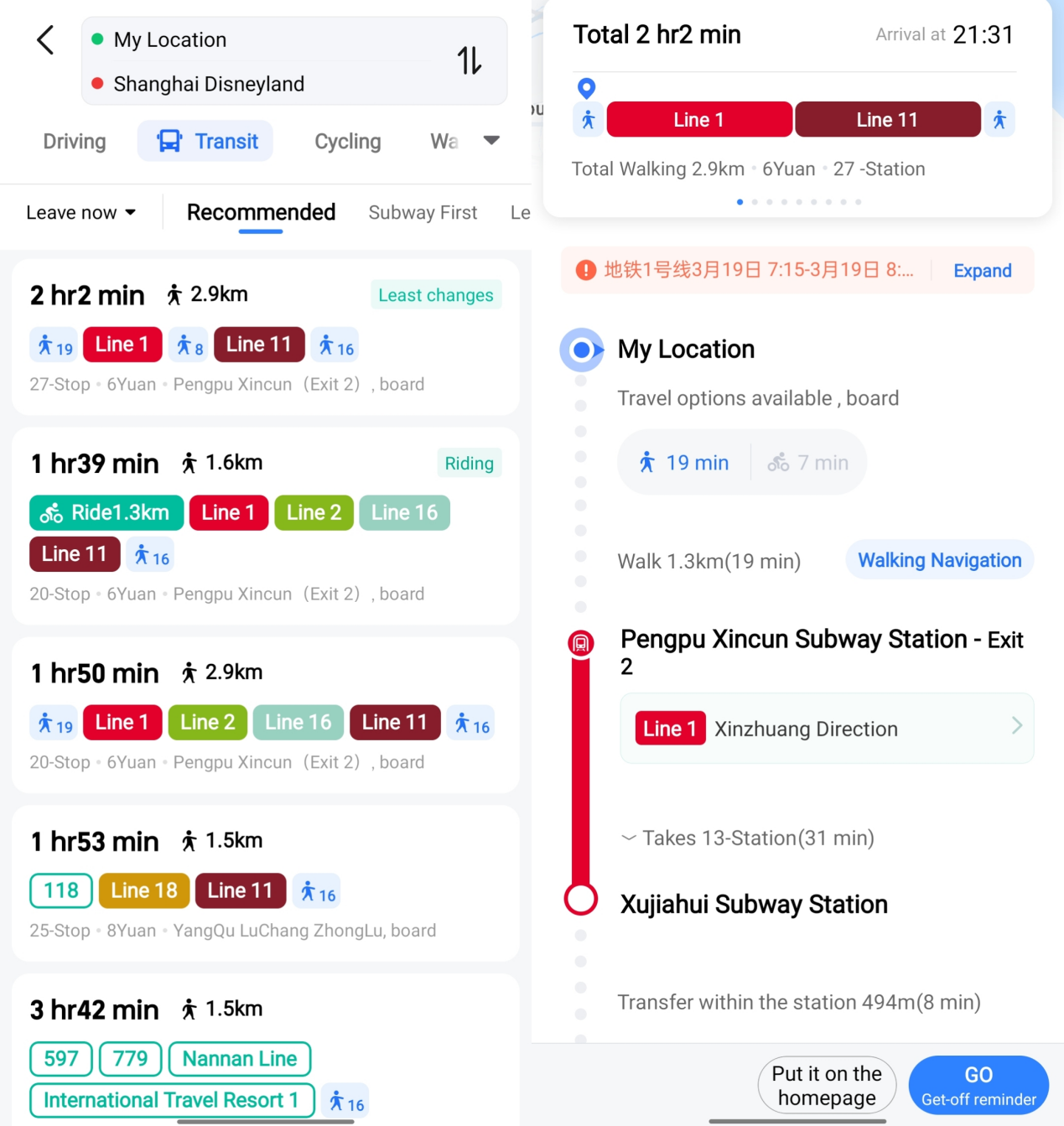
Historical route screenshot from the same Shanghai guide, retrieved September 10, 2026. Times, fares and disruption messages in the image are examples, not today's travel advice. Tap to enlarge; app version was not specified by the source. Image rights remain with the original publisher.
AMap taxi booking and DiDi
Shanghai's guide also describes a taxi-booking option inside AMap. Navigation and ride booking are separate tasks: check the account, pickup point, provider, fare and payment requirements shown in the booking flow. An English map does not guarantee an English screen for every linked provider.
You can also use AMap simply to confirm the destination before booking through DiDi. Send the driver a recognisable entrance or pickup bay, not just the blue location dot. Do not create simultaneous orders in two apps.
If something goes wrong
| Problem | Next step |
|---|---|
| Several similar hotel names | Match the city, district and road number; ask the hotel to confirm. |
| The dot jumps inside a station | Use exit signs, floor numbers and landmarks instead of following the moving dot. |
| A suggested path crosses a barrier | Follow pedestrian signs; find a permitted crossing or ask staff. |
| A notice is still Chinese | Translate that notice separately and verify disruptions with staff. |
| Data stops working | Open your saved address card and route screenshots; ask for help at a staffed location. |
Ready to navigate?
Before leaving Wi-Fi, identify your first action: the street to follow, station entrance or boarding stop. Save the Chinese destination address with the address card tool. A saved screenshot is a reference, not live navigation; check signs and current service notices during the journey.
FAQ
Is Gaode Maps the same as AMap?
Yes. You may see AMap, Gaode Maps, Gaode Ditu or 高德地图 when people refer to this service. Use the publisher listing above to identify the app.
Does AMap work in English?
The current publisher listing includes English. Local place names, messages and partner services can still appear in Chinese.
Do I need a Chinese phone number?
Try the map task before signing in if your version allows it. Saving places and booking rides may have separate verification requirements. If a phone number is requested, check the available country codes. Keep an alternative without a Chinese number.
Can I rely on it offline?
AMap's App Store release notes advertise offline navigation, but this does not establish that every route, language or device works offline. If your installed version offers offline downloads, download the area you need while connected, then test searching for your destination and starting the intended route without mobile data or Wi-Fi, somewhere safe. Check both the map and route instructions; a visible cached map alone is not enough. Keep the Chinese address and important screenshots separately. Traffic updates and live service information need a current connection. Publisher release notes.
Related guides
Sources and review
Publisher download pages, store listings and the Shanghai guide rechecked September 30, 2026. The route checks and fallback workflow are editorial guidance; this article is not a recorded device field test.