
Quick answer
Use DiDi China or an available DiDi entry inside Alipay or WeChat. Set the pickup point and destination, check the fare and payment method, then match the vehicle's number plate before boarding. DiDi's publisher describes English support, overseas mobile-number login and bilingual messages. Verification and available payment methods still depend on your account. DiDi China listing.
If setup fails at an airport, go to a staffed transport desk or official taxi queue. Keep your Chinese hotel address ready.
Can I use Grab in mainland China?
Plan on DiDi or an official taxi for a mainland journey. Grab's published operating footprint is Southeast Asia; mainland China is not listed among those markets. Its location directory and July 2026 company update support this planning advice.
A Chinese-language Grab website or a wallet partnership does not establish pickup availability in a mainland city. If your own app offers a new partner service, check the actual pickup city, operator and terms before relying on it. Hong Kong and Macau require their own availability check.
Choose your booking route
| Starting point | What to do | Important check |
|---|---|---|
| Standalone app | Open DiDi China on the App Store, or find the official DiDi China listing in your Android store | Avoid confusing it with a driver app or an app for another country. |
| Alipay | Search for DiDi or use the ride-hailing entry if available | Inspect the active account and payment authorisation. |
| Look for Ride Hailing in Services, or the DiDi entry available to your account | The wallet's payment setup and DiDi's booking details both matter. |
Shanghai's illustrated guide describes the app and wallet routes. Their menus are not identical. Follow the flow you actually opened and avoid placing duplicate orders.
Switch DiDi to English
The official screenshot guide shows 我的 (Me) → 设置 (Settings) → 通用 (General) → 多语言 / Language → English → Confirm. These screenshots are from the source's July 21, 2026 guide; your layout may differ.
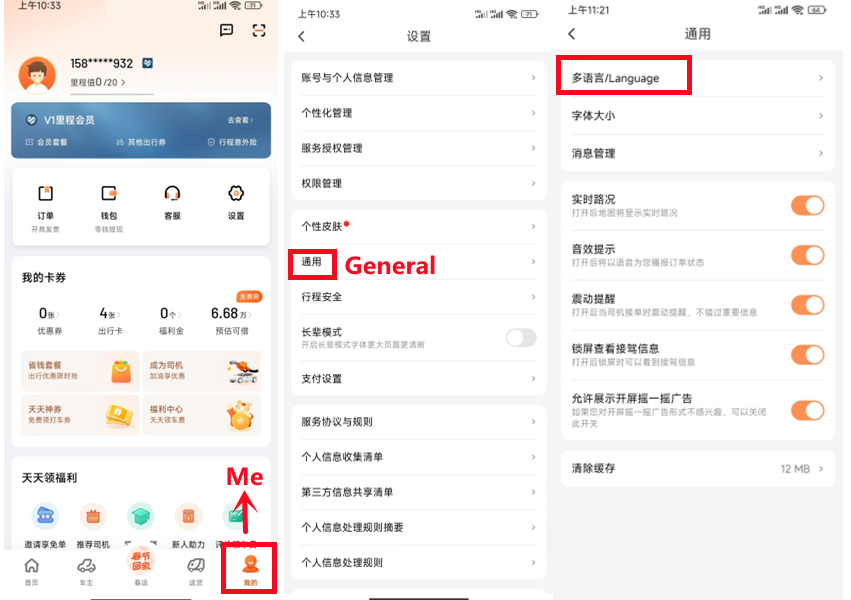
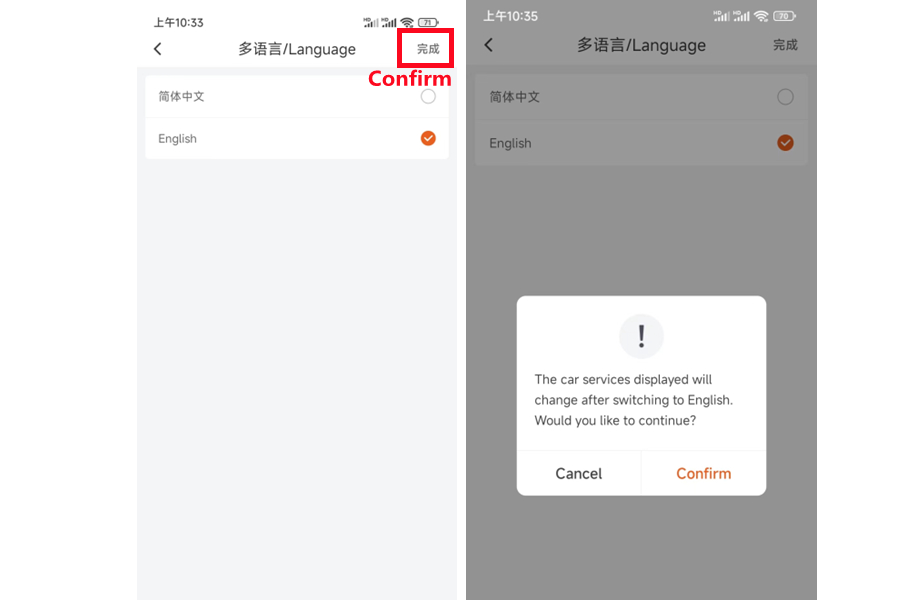
Read the confirmation before accepting: the example says the displayed car services change when switching to English. Images from International Services Shanghai, retrieved September 11, 2026. App version was not specified; these are attributed source examples, not our field test. Tap either image to enlarge. Rights remain with the original publisher.
Book a ride in five checks
1. Set a pickup point you can actually reach
Zoom in before accepting the automatic pin. Match the entrance, side of the road and level. At an airport or station, follow the designated ride-hailing signs and the order's pickup instructions. A departure drop-off lane and an app pickup bay may be different places.
2. Check the destination's exact branch
Paste the Chinese hotel name or address. Match the city, road and branch against your booking. Use AMap or ask the hotel if the result looks wrong.
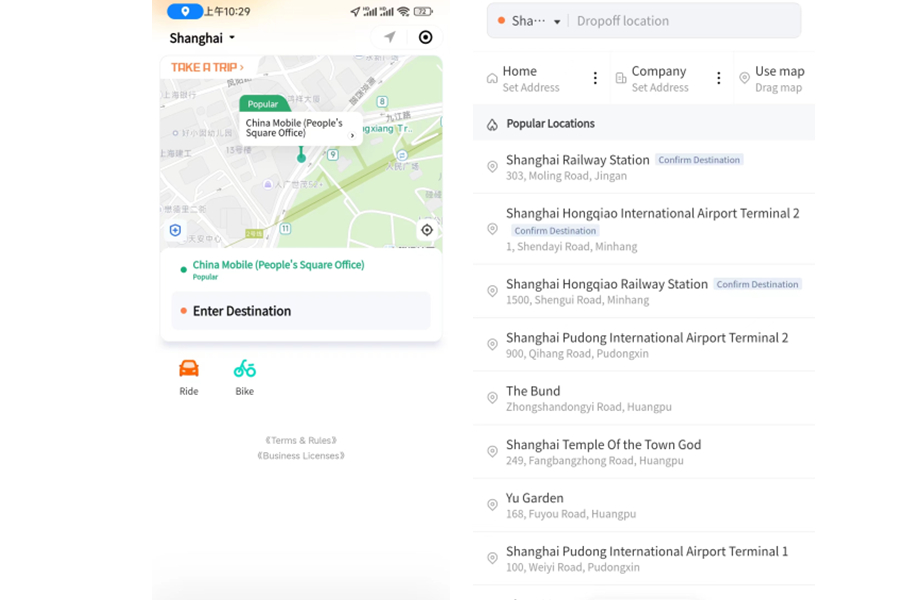
Destination-search example from the same Shanghai guide; retrieved September 10, 2026. Match your own terminal or branch rather than selecting the first familiar name.
3. Check the vehicle and total
Choose enough seats and luggage space. Read the displayed fare basis, payment method and any waiting, toll or cancellation terms. A quoted estimate and a metered taxi fare are not necessarily the same kind of price.
4. Use short messages while waiting
The publisher advertises English–Chinese translation in order chat. Send one concrete detail at a time: “I am at pickup bay B3” or “I am beside the hotel main entrance.” Only use a bay number that matches your actual location. If the driver calls, use the driver-call guide.
5. Match the car before boarding
Compare the plate, vehicle and order information. Shanghai's guide describes confirming the last four digits of the booking phone number with the driver. Use only the requested ride-identification detail; an SMS login code or payment password is different and should not be shared.
After the ride
Check the completed order and payment status in the app or wallet. If it shows an outstanding payment, follow that order's instructions. If a card charge is pending, inspect the transaction before paying again. Keep the order record if you need support or left an item in the vehicle.
Common problems
| Problem | What to do next |
|---|---|
| No SMS arrives | Check country code, roaming and the number used by that booking flow; avoid repeated rapid requests. |
| Driver is across a barrier | Message the exact entrance or bay. Move only to a permitted, safe waiting area. |
| Driver asks you to cancel | Check the app's reason and fee before deciding; use support if the request is unclear. |
| Vehicle does not match | Do not board. Stay in a staffed area and contact in-app support. |
| Payment fails | Check the order status and a supported alternative. Do not assume an app ride can be settled in cash. |
A pickup message the driver can use
Use the actual pickup point displayed in your order, then add one visible detail: the terminal, door, floor or numbered bay. Do not send an invented bay number or move to a restricted road to follow the map pin.
- 我在___号门外。 — I am outside door number ___.
- 我在___号上车点。 — I am at pickup point number ___.
- 我不会说中文,请发消息。 — I do not speak Chinese; please send a message.
Replace the blank only with a detail you have checked. A message sent to the driver does not itself change the pickup point or destination in the order. If the driver and order disagree, clarify the location through the same booking before moving. Keep the order open until you have matched the vehicle and completed the ride.
FAQ
Can foreigners use DiDi without a Chinese number?
DiDi China advertises overseas-number login in its English flow. Check the supported country code and whether your number can receive the verification message. This is not a guarantee for every network or mini program.
Can I use an international card?
The publisher lists international bank cards among its payment options. Confirm the card and payment method shown for your account; a saved card does not guarantee every attempted charge will succeed.
How do I get a taxi if no app works?
Use an official taxi queue or ask hotel or station staff to help arrange a licensed taxi. Show the Chinese address and confirm payment options before travelling. See airport-to-city choices.
Sources and review
Sources checked September 11, 2026. Pickup checks and fallback steps are editorial guidance; no device field test was performed.