Quick Answer
Do not make Google Maps your only navigation plan for mainland China. UK travel advice lists Google among services blocked there, so do not assume it will load on a mainland connection. Even where access works, check the specific destination and route separately. Prepare AMap Global or another suitable local map and save the hotel’s exact Chinese address before travel.
If this happens, do this
| Situation | What to do next |
|---|---|
| A map loads but the place seems wrong | Compare the Chinese name, branch and street address with your booking. |
| Your usual online service will not load | Use the map prepared before travel and a saved address; ask staff to confirm the route. |
| A route requires an unfamiliar transfer | Check station names, direction and exit rather than relying only on the estimated time. |
| You have no network | Show an offline address card to staff or a licensed taxi driver. |
Choose a Map App for China: AMap and Alternatives.
Why Google Maps Can Be a Problem in China
Check local place details
Foreign visitors often need exact hotel entrances, metro station exits, restaurant locations and ride-hailing pickup points. Check your exact hotel entrance, station exit and transport route in a local mapping app, and compare them with the property or transport operator’s current information.
Chinese names matter
A taxi driver, hotel staff member or delivery rider may not recognize an English place name. Local map apps help you copy and show the Chinese name and address.
Ride-hailing and transit need local context
Didi pickup points, airport roads, mall entrances and metro transfers are easier when the app understands local place and entrance data.
Best Alternatives
Amap / Gaode Map
A practical option to check before travel. Use it for walking, metro, driving routes, hotel addresses, Chinese names and route comparisons. Amap Global listings emphasize English support for overseas users and real-time route data.
Baidu Maps
Useful in China, especially if you can handle some Chinese interface elements. It may have strong local data, but English usability can vary by version and platform.
Apple Maps
For iPhone users, Apple Maps can be useful in China in some cases, but you should still keep Amap as a backup for local names and pickup points.
This is an AMap example, not Google Maps. Check the route in an app with usable local information.
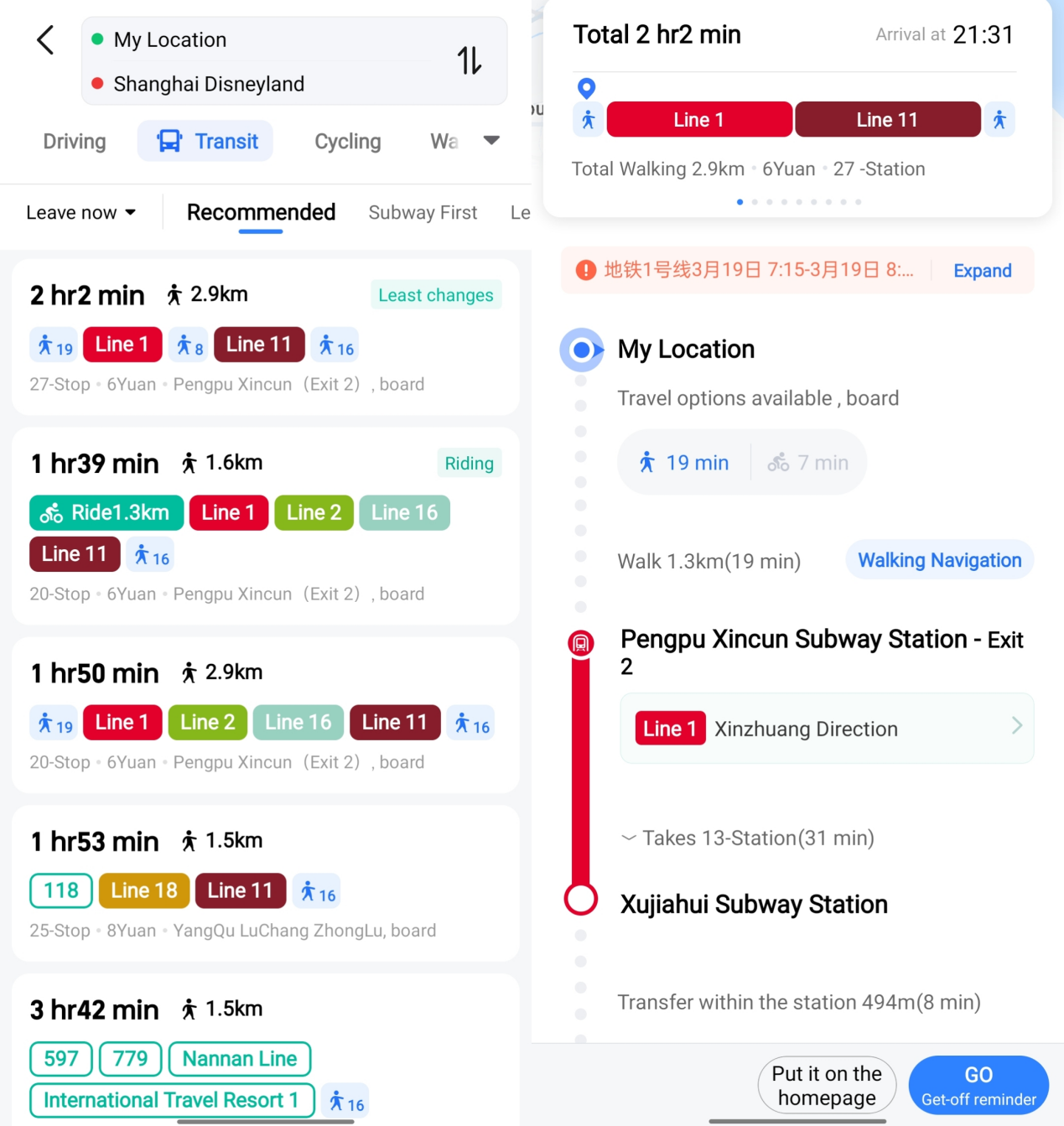
AMap route example. Check the Chinese place name, route mode and final destination.
Image source: Shanghai International Services. Screenshot rights remain with the publisher. Reference example; screens can vary by device, account and app version. Dates and prices shown are not live.
What to Set Up Before Departure
- Install Amap / Gaode Map.
- Search your hotel and save it.
- Save the Chinese hotel name and address.
- Screenshot the address.
- Add airport, train station and hotel as favorites.
- Save your first route from airport to hotel.
- Learn how to copy address text.
How to Use Maps in Real Situations
Airport to hotel
Search the hotel in Amap. Compare metro, taxi and ride-hailing travel time. If using Didi, make sure the pickup point is correct, not just the general airport terminal.
Showing a taxi driver
Open your hotel place page and show the Chinese address. If needed, use the phone number in the hotel listing.
Ordering food to a hotel
Copy the hotel address in Chinese and include room or lobby delivery instructions when possible.
Walking to a metro station
Use the route instructions and look for exits. In large stations, the correct exit can save a long walk.
Backup Plan
- Screenshot your hotel address.
- Save the Chinese address in Notes.
- Keep the hotel phone number.
- Save offline copies of booking confirmations.
- Ask hotel staff to write the destination in Chinese if needed.
Related Guides on Get Around CN
- How to Use Amap / Gaode Map in China
- How to Save Your Hotel Address in Chinese
- How to Use Chinese Addresses in China Apps
- How to Show Your Destination to a Taxi Driver in China
- How to Take the Subway in China as a Foreigner
Sources and review
Google-access guidance rechecked on 2026-09-30; other sources reviewed on 2026-09-10. These sources support the service or policy facts; the practical fallback steps are editorial guidance. This is not a recorded field test.