
Quick Answer
First check the number and country code, then confirm that the line receiving the code has mobile service. Working Wi-Fi or a data eSIM is not proof that SMS works. Request another code only after the app’s countdown ends, and use the newest valid code.
If this happens, do this
| Situation | What to do next |
|---|---|
| Normal texts arrive but one app’s codes do not | Check the country-code selector and the app’s support page; some services restrict number types. |
| No texts arrive at all | Ask the mobile operator about roaming, SMS blocking, plan status and the selected network. |
| You requested several codes | Wait for the countdown and enter the latest one; rapid repeats may trigger rate limits. |
| You use a virtual number | Check whether the service accepts it; do not buy a pre-verified account as a workaround. |
Register WeChat with a Foreign Phone Number.
Why SMS Codes Fail
The registered line has no SMS roaming service
Your phone may have mobile data through an eSIM but your original number may not be active for SMS. Data-only eSIMs usually do not receive SMS for your home number.
The app blocks or delays the code
Some apps limit how often you can request a code. If you tap repeatedly, you may trigger a cooldown.
Country code or number format is wrong
Check the country code, remove leading zeros where appropriate and make sure the app supports your region.
Dual-SIM confusion
Your phone may be using one SIM for data and another for SMS. Make sure the number receiving the code is still active and has network service.
Bank or payment verification uses a different channel
A bank card approval may go through your bank app, email, push notification or 3-D Secure page instead of a normal SMS.
An internet connection does not prove SMS is working
Keep track of which number is registered with the app or bank. The number receiving a code may be your home SIM even while another plan supplies data. The overseas-number plan helps separate these requirements.
A working data SIM does not prove that the number registered with an app can receive SMS.
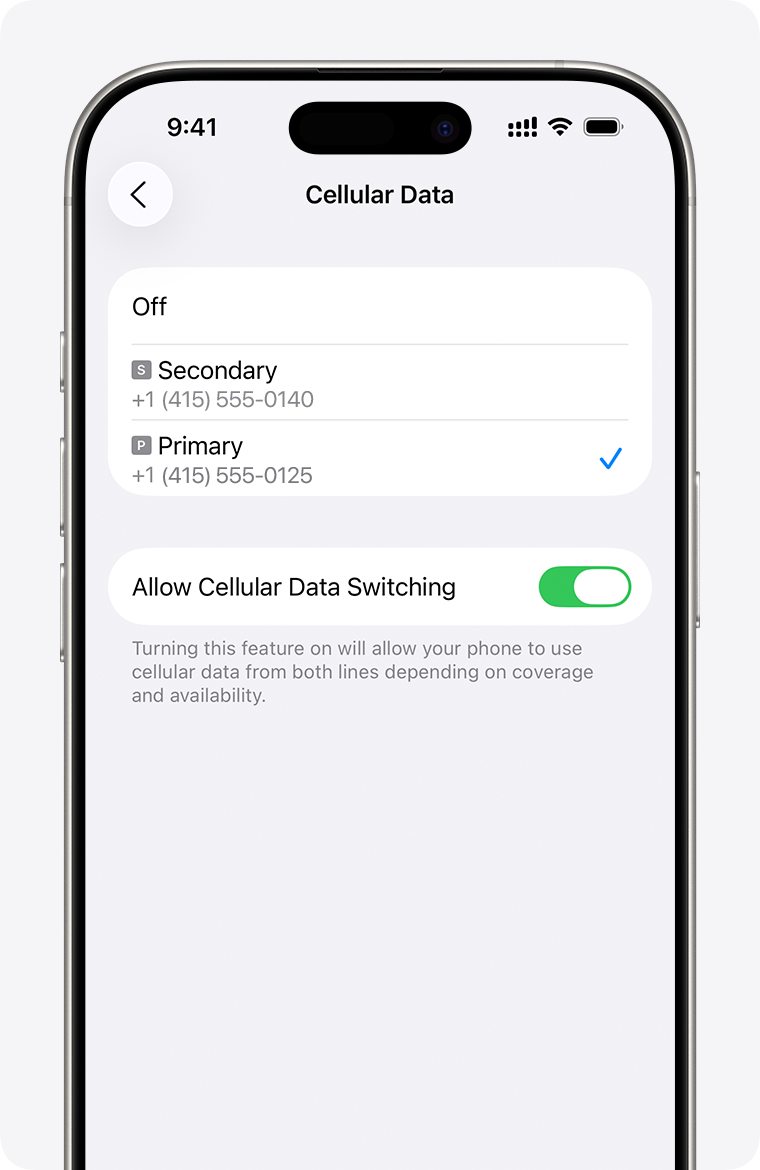
iPhone Cellular Data: choose the SIM used for data. SMS and calls use separate settings. The example’s enabled data-switching option is not a recommendation.
Image source: Apple Support. Screenshot rights remain with the publisher. Reference example; screens can vary by device, account and app version. Dates and prices shown are not live.
Best Setup Before Departure
- Install Alipay, WeChat, Didi, Amap and your hotel/booking apps.
- Log in while you are still at home.
- Add your bank cards before departure if possible.
- Confirm with your operator that your home line can receive SMS in mainland China, and check its roaming charges.
- Do not depend on a data-only eSIM for SMS codes.
- Save recovery email and backup codes where available.
- Keep your home SIM installed until all critical apps are set up.
Should You Get a Chinese SIM?
A local Chinese SIM can make some local services easier, but it requires real-name registration. Beijing's official SIM-card guide says users should prepare a passport, and China's foreign-investment service page says foreigners can bring passports or foreign permanent resident ID cards to telecom operator service branches. A local SIM can help with local calls and local SMS, but it may not replace your home number for bank-card verification.
eSIM, Roaming and Local SIM: How They Affect SMS
International roaming
Best for receiving SMS from your home bank and existing app accounts. It can be expensive for data, but many travelers keep it on for SMS only.
Data-only eSIM
Good for internet access. Not enough if you need to receive SMS on a phone number.
Local Chinese SIM
Useful for local calls, hotel contacts, delivery riders and some services. Requires passport registration and may take time to buy.
Troubleshooting Checklist
- Restart your phone.
- Keep the registered SIM or eSIM line enabled and confirm voice/SMS roaming with your operator. The phone’s Data Roaming switch controls mobile internet; it is separate from keeping a line available for ordinary SMS. Do not enable home-line data roaming just to troubleshoot a text message. Follow your carrier’s instructions and check call, SMS and data charges separately.
- Disable airplane mode.
- Confirm signal bars on the correct SIM.
- Wait until the app’s displayed countdown ends before requesting another code.
- Try voice call verification if the app offers it.
- Use a different network area, especially outside basements.
- Update the app.
- Use a stable connection and follow the app’s own account-recovery guidance.
- Contact app support if too many attempts lock you out.
Useful Chinese Phrases
- I cannot receive the SMS code. 我收不到短信验证码。
- Can you call me instead? 可以给我打电话吗?
- I need a SIM card for tourists. 我需要游客用的手机卡。
- I have my passport. 我带了护照。
Related Guides on Get Around CN
- China First Visit Checklist for Foreigners
- eSIM, Roaming or Local SIM: Best Internet Options for China
- How to Use Alipay in China as a Foreigner
- How to Use WeChat Pay in China as a Foreigner
- How to Use DiDi in China as a Foreigner
Sources and review
Overview sources reviewed on 2026-09-10; the distinction between SMS roaming and mobile-data settings was rechecked on 2026-09-30 against Apple and operator guidance. The practical fallback steps are editorial guidance. This is not a recorded field test.