Quick Answer
Treat mobile data and SMS as separate requirements. A data-only travel eSIM can provide internet but cannot receive verification texts itself. Keep an SMS-capable home line active if your operator supports roaming, or ask an official Chinese operator about a passport-registered local SIM.
If this happens, do this
| Situation | What to do next |
|---|---|
| You need maps and browsing | Check coverage, data allowance, activation window and hotspot support for your plan. |
| You need verification codes | Confirm SMS roaming on the actual phone number attached to your account. |
| Your phone supports two lines | Choose the data line deliberately; check whether automatic data switching could incur home-network roaming charges. |
| You buy a local SIM | Use an operator-run counter, bring your passport and ask how to cancel or stop renewing the plan. |
How to Receive SMS Codes in China Apps.
Option 1: International Roaming
Best for
- Receiving SMS from your home bank
- Keeping your normal phone number active
- Short trips where cost is acceptable
- First arrival before you buy anything locally
Weaknesses
- Data can be expensive.
- Speed and access depend on your carrier.
- Some plans have low data limits.
Best use
Keep the SMS-capable line active if your operator supports roaming. Check voice and SMS availability separately from the phone’s data-roaming switch, and confirm charges with the operator.
Data, SMS and calls: choose separately
Before buying a plan, list which of these you need: mobile internet, verification texts to your existing number, and a local number people can call. A data-only plan addresses only the first item. Use the no-Chinese-number plan to match each task with a fallback.
Check the selected data line and its roaming charges. The example’s enabled data-switching option is not a recommendation.
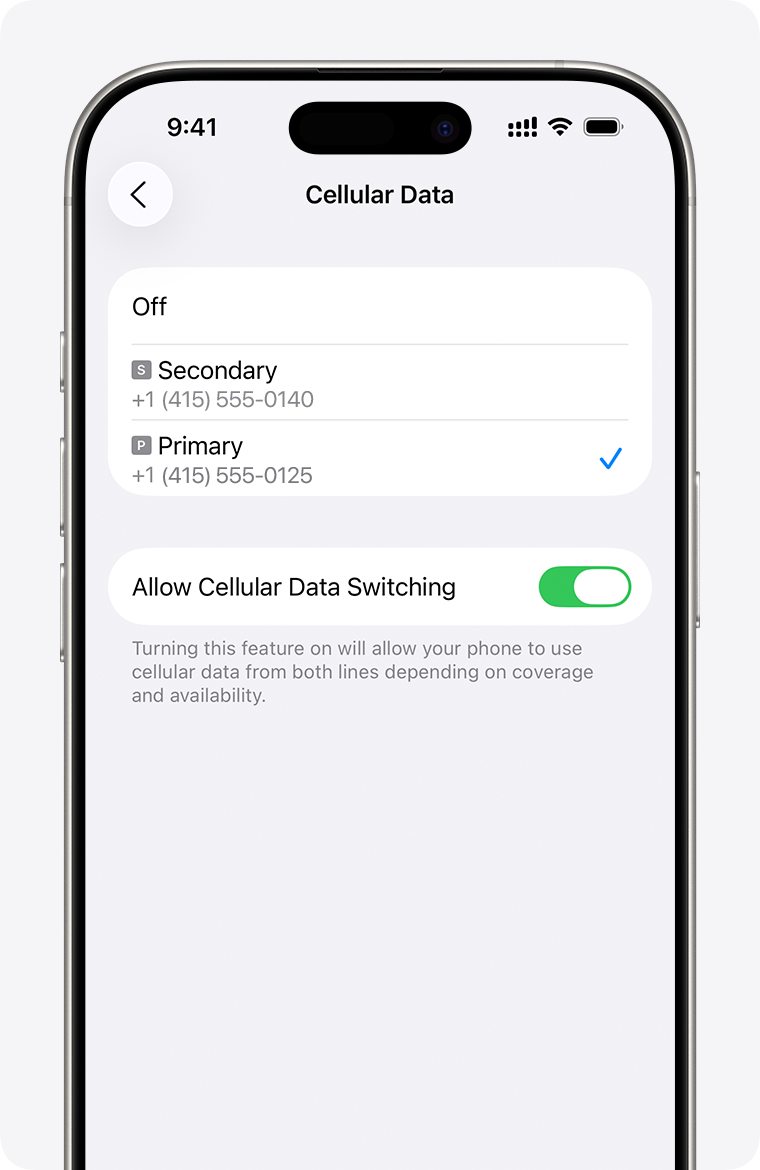
iPhone Cellular Data: choose the SIM used for data. SMS and calls use separate settings.
Image source: Apple Support. Screenshot rights remain with the publisher. Reference example; screens can vary by device, account and app version. Dates and prices shown are not live.
Option 2: Travel eSIM
Best for
- Getting internet immediately after landing
- Avoiding a SIM-card counter
- Short trips
- Phones that support eSIM
Weaknesses
- Many eSIMs are data-only.
- They may not give you a Chinese phone number.
- They do not help if an app requires local SMS.
Best use
Use eSIM for data, but keep your home SIM active for SMS verification.
Option 3: Local Chinese SIM
Best for
- Longer stays
- Local calls
- Delivery rider or driver calls
- Some local services that prefer a Chinese number
What you need
Beijing's official SIM-card guide says users should prepare a passport, and China's foreign-national service information says foreigners can bring passports or foreign permanent resident ID cards to telecom operator service branches. The exact purchase flow may vary by airport, city and carrier.
Check the exact phone model and SIM format before buying. A physical SIM needs a compatible SIM tray. An iPhone must be carrier-unlocked to use another provider. Apple states that a mainland-carrier eSIM cannot be used on an iPhone purchased outside mainland China; this does not mean all international travel eSIMs are unavailable. For an eSIM-only iPhone, confirm a supported roaming or travel-eSIM fallback before arrival. Ask the operator about other devices rather than applying the iPhone rule to every phone.
Weaknesses
- Takes time to buy.
- Requires real-name registration.
- You may need help if you do not speak Chinese.
- It may not receive SMS from your home bank.
Recommended Setup by Trip Type
3–7 days
Use home SIM roaming for SMS plus travel eSIM for data. Buy a local SIM only if you need local calls.
1–4 weeks
Use home SIM for important verification, then consider a local SIM for daily life and delivery/driver calls.
Long stay
Get a local SIM from an official carrier store and keep your home number available for bank/security messages.
App Setup Tips
- Install apps before departure.
- Log in while you can receive SMS at home.
- Add cards before travel if possible.
- Keep roaming SMS active for your home number.
- Do not remove your home SIM before payment apps are stable.
- Save emergency contacts offline.
What Can Go Wrong
You have data but no SMS
This often happens with data-only eSIM. Use your home SIM for SMS or local SIM for local codes.
You have a local SIM but bank verification fails
Your bank may still send verification to your home number. Keep that number active.
Airport Wi-Fi requires SMS
Have mobile data ready before relying on airport Wi-Fi.
Related Guides on Get Around CN
- How to Receive SMS Codes in China Apps
- China First Visit Checklist for Foreigners
- What to Do in the First 2 Hours After Landing in China
- How to Use DiDi in China as a Foreigner
Sources and review
Overview sources reviewed on 2026-09-10; the iPhone carrier-lock and SIM-format caveat was rechecked on 2026-09-30 against Apple’s guidance. The practical fallback steps are editorial guidance. This is not a recorded field test.