
Quick Answer
12306 has an official English registration channel for foreign-passport holders. Set up the passenger record and identity verification before you need a ticket. Travel with the same original document used for the booking; a booking screenshot is not a replacement passport.
If this happens, do this
| Situation | What to do next |
|---|---|
| You cannot register with a foreign phone number | Check the official English website: its registration form includes email. Do not copy instructions for a different platform. |
| An order is paid but no seat is issued | Read the actual ticket status. A request or waitlist is different from an issued ticket. |
| You need a different train | Open the existing order and review the alteration/refund offer before buying again. |
| The station machine rejects your passport | Use a staffed counter or assisted gate with the original passport and booking details. |
Change or Refund a China Train Ticket.
What 12306 Is Best For
Use 12306 when you want:
- Official China Railway ticket booking.
- Direct order management.
- Train timetable search.
- Refunds, changes and railway-specific services.
- A more direct relationship with the railway system.
If you only need one or two tickets and want the easiest experience, Trip.com may be simpler. If you are traveling across China by train many times, learning 12306 can be worthwhile.
What You Need
Prepare:
- Passport information.
- Email address or phone number depending on the current registration flow.
- A payment method accepted by the current 12306 interface.
- Patience for identity verification.
- Chinese station names or accurate English station names.
The exact process can change, so follow the current on-screen instructions carefully.
Registration Tips
When registering:
- Use your passport name consistently.
- Use the name and document details required for your real passport; do not invent a Chinese identity.
- Double-check passport number and expiration date.
- Save login details securely.
- Complete identity verification before an urgent travel day.
Do not try to solve verification problems 30 minutes before train departure.
Searching Trains
Chinese cities often have multiple stations. For example, a city may have North, South, East, West, Main and airport-area stations. Check your station carefully before booking.
Look at:
- Departure station.
- Arrival station.
- Train type: G, D, C, Z, T, K or others.
- Travel time.
- Seat class.
- Departure and arrival time.
High-speed trains are usually G/D/C categories and are best for most intercity routes.
Official search-screen example
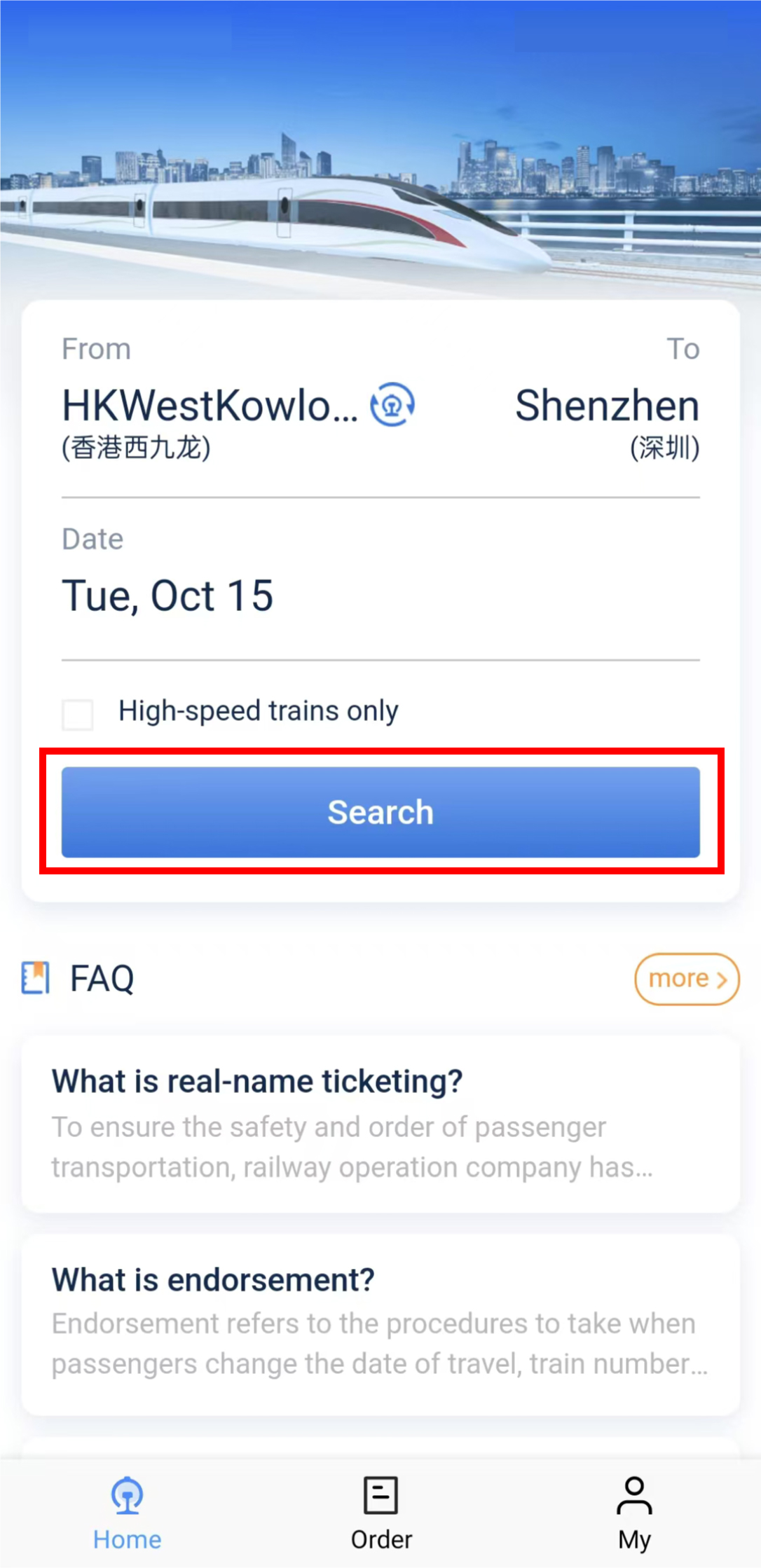
Tap the image to enlarge it; choose Actual size to read small labels.
The official example shows selection of origin, destination and travel date. Check each field before searching.
Source: MTR: buying tickets on 12306. Source date: not stated. Retrieved 2026-09-10. App version was not specified in the source; this is not a Get Around CN field test. Image rights remain with the original publisher.
Booking and Payment
After choosing a train, enter passenger details exactly as registered. Payment methods can vary by platform version and card support. If payment fails, do not keep retrying blindly. Check whether your card supports online international transactions, try another method, or use Trip.com as a backup.
Boarding with a Passport
For foreigners, your passport is the key travel document. Bring the original passport used for booking. At some stations, you may need manual lanes if automatic gates do not read your passport smoothly. Arrive earlier than a local traveler would, especially at large high-speed rail stations.
Refunds and Changes
12306 is useful for order management, but rules depend on ticket type, timing and railway policy. Read the current refund/change information inside the platform before canceling. If you booked through Trip.com, start with that order and its support channel, particularly for agent fees. The 12306 English FAQ says registered passengers who complete facial identity verification in the 12306 mobile app can manage eligible tickets bought at railway counters, machines, ticket agencies or by other people. This does not guarantee that every Trip.com order can be managed in your 12306 account. Check the ticket restrictions and coordinate any change with the original seller; a staffed railway counter can advise when online handling is unavailable.
Compare booking channels
12306 is the official railway platform and has an English booking route for eligible foreign-passport users. Trip.com is a third-party booking service. Compare the final total, verification requirements and support available for the exact journey. Start with the original booking channel, then check which 12306 or staffed-counter alternatives apply if that route is unavailable.
Common Problems
Passport verification is delayed
Finish setup early. Use Trip.com or station ticket windows as backup if needed.
You booked the wrong station
Check station names on Amap and your hotel route before buying. Some stations are far apart.
Payment fails
Check whether the current order is awaiting payment, confirmed or cancelled before trying another eligible method. Do not create a duplicate booking while the first payment is unresolved.
Gate does not read your passport
Use the manual channel and show your passport. Keep your booking information ready.
Finish the booking, not just the payment screen
The MTR illustrated 12306 guide separates passenger selection, train selection, confirmation, payment and checking the order. Use that sequence to spot where you are stuck.
- Check the passenger's identity information and the exact stations before submitting.
- A city search can return more than one station. Read the station on the selected train, not only the city in the search box.
- Complete payment within the time shown for your order.
- Open the order details afterward and check the booked journey. Keep an unresolved payment attached to that order instead of immediately buying again.
For station-specific arrival and boarding preparation, continue with the China train guide.
FAQ
Can foreigners register on 12306?
The 12306 English registration page states that foreign passports are accepted for registration.
Is 12306 better than Trip.com?
12306 is the official railway platform and has an English booking route for eligible foreign-passport users. Compare verification, final charges and the after-sales process if you consider a third-party channel.
Do I need my passport to board trains in China?
Yes. Bring the original passport used for booking, not just a photo.
Next steps
Sources and review
Sources reviewed on 2026-09-30. These sources support the service or policy facts; the practical fallback steps are editorial guidance. This is not a recorded field test.