Quick answer
Go to a safe staffed place, such as your hotel reception or a station service desk. If there is immediate danger call the appropriate emergency number. Then protect the phone number and accounts, locate your booking details and arrange a way to pay without the missing device.
First decide: misplaced or stolen?
Ask staff to help contact the place where you last had the phone. If it may be in a taxi or train, retain the journey time, route, receipt and vehicle or train details. Contact the transport provider’s official lost-property channel.
Use your device maker’s official lost-device service from a trusted device if you can sign in. Follow its current instructions to locate or lock the phone. Do not follow a stranger to an unsafe location because a map appears to show the device there.
Official phone recovery tools
- iPhone: use Apple’s lost-iPhone instructions. If Find My was enabled before the loss, try iCloud Find Devices. Apple says this page can be used without a verification code through the Find Devices option. Mark the device as lost; do not remove it from Find My, which removes Activation Lock.
- Android with Google services: follow Google’s Find Hub instructions. Locating or securing a device depends on its setup, account access and connectivity. If the service is unavailable on your connection or device, use the manufacturer’s official support and continue with your operator and bank.
Remote erasure can permanently remove data and affect later tracking. Read the device maker’s current warnings before deciding; it is not the first recovery step here. Never enter a passcode or verification code into an unsolicited “phone found” link.
Use a safe contact method that you can still access. Never share account passwords with someone claiming to have found the phone.
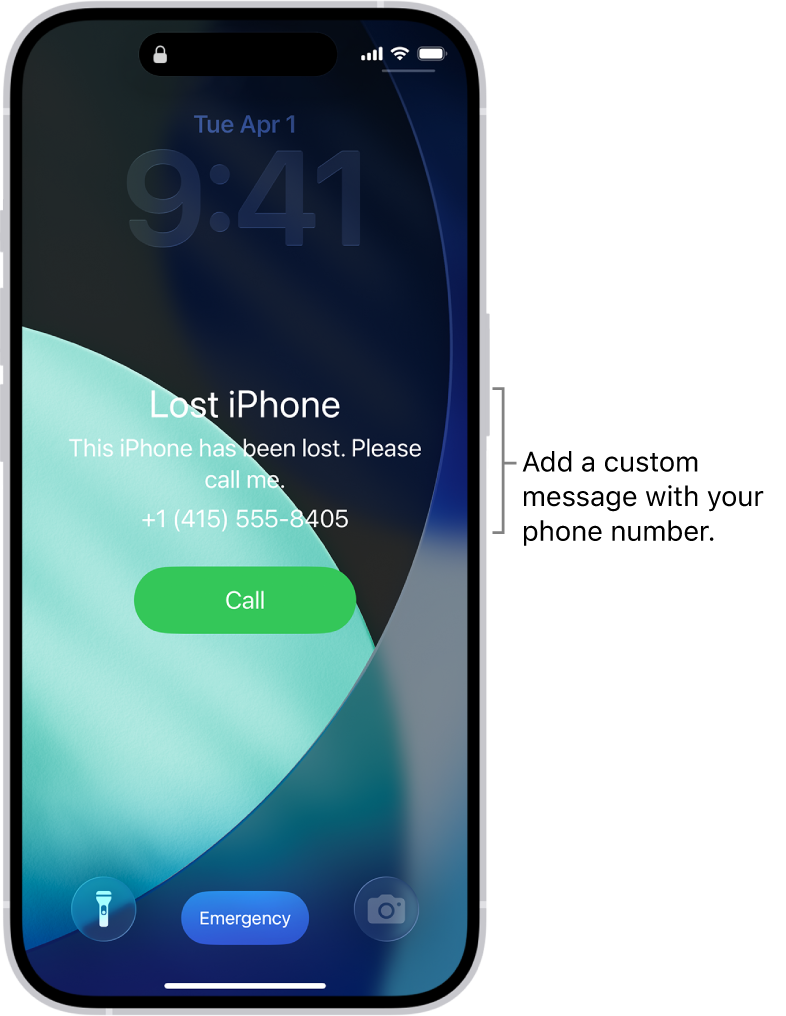
Apple Lost Mode example: a contact message on the lock screen. The number shown is sample data.
Image source: Apple Support. Screenshot rights remain with the publisher. Reference example; screens can vary by device, account and app version. Dates and prices shown are not live.
Protect account access
Contact the mobile operator to discuss blocking the missing SIM and recovering the number. Contact your bank or wallet provider if payment access may be exposed. Use official websites, existing documents or the number on a physical card to find support; avoid links in unsolicited recovery messages.
If you borrow a device, do not let it save your password, and sign out afterwards. Do not give a helper a verification code or ask them to impersonate you during identity checks.
Recover the trip essentials
- Ask reception or your booking provider to locate the confirmed hotel booking.
- Find the next flight or train details using your own email or booking account.
- Keep your passport with you; do not assume a screenshot is a substitute for travel.
- Use cash or a physical card at an accepting merchant.
- Arrange an authorized contact number for any immediate pickup or delivery.
Get a replacement communication plan
An operator may require your passport and account checks for number recovery or a new SIM. A new number does not automatically restore access to accounts attached to the old one. Work through the provider’s recovery process rather than repeatedly creating replacement accounts.
Before the trip, keep a payment backup and an offline copy of important contact details somewhere separate from your phone.
Sources and review
Sources reviewed on 2026-09-10. These sources support the service or policy facts; the practical fallback steps are editorial guidance. This is not a recorded field test.